Understand the problem first.
Use Claude Code, for example, to analyse and plan in a custom workflow. Define what to build and what a finished result should do.
Bring your ideas to life. Connect agents, models and tools for code, automation and creative work.
Add project context and define what a finished result should do.
One agent, a pair or a team. The right models for the right roles.
Files, tools and connected stages in one workspace.
Review changes, tests and evidence before accepting the result.
Not every step needs your most expensive model. Build a cascade: a strong model for analysis, a cheaper one for execution. Save expensive-model tokens for the decisions that need them.
Use Claude Code, for example, to analyse and plan in a custom workflow. Define what to build and what a finished result should do.
Hand clearly defined steps to a cheaper API, a model with a free allowance or a compatible local model.
Review the work and fix what needs attention. Bring a stronger model back for harder decisions when needed.
This example uses a custom workflow. Available connections, free allowances and limits depend on the mode and provider. Local models require your own hardware. Savings depend on the task, context and number of revisions.
Explore the real application. Plan, create and review results with tools that fit the task.
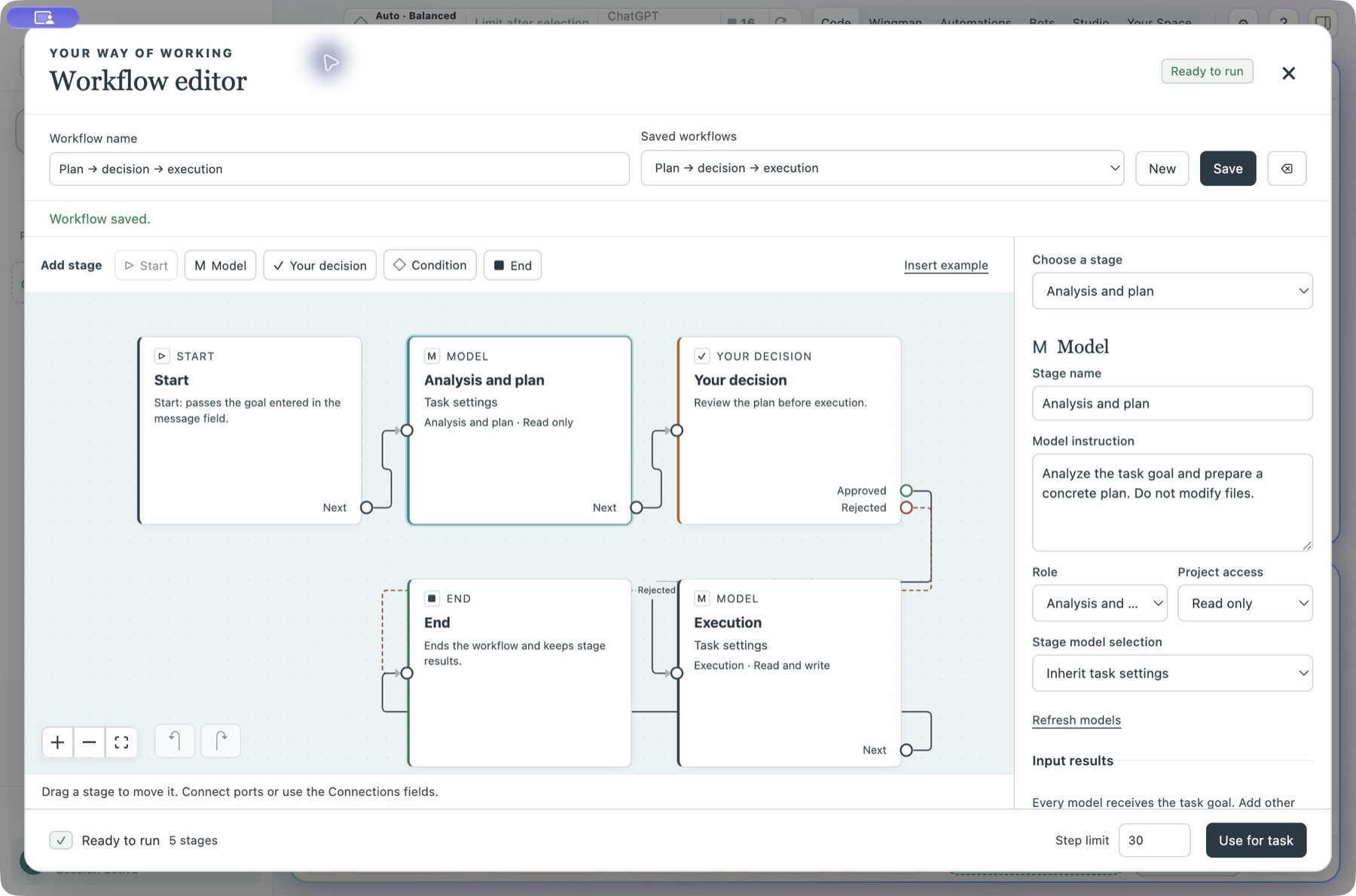
Connect analysis, your decision and execution. Set model roles and the conditions for each next step in the visual editor.
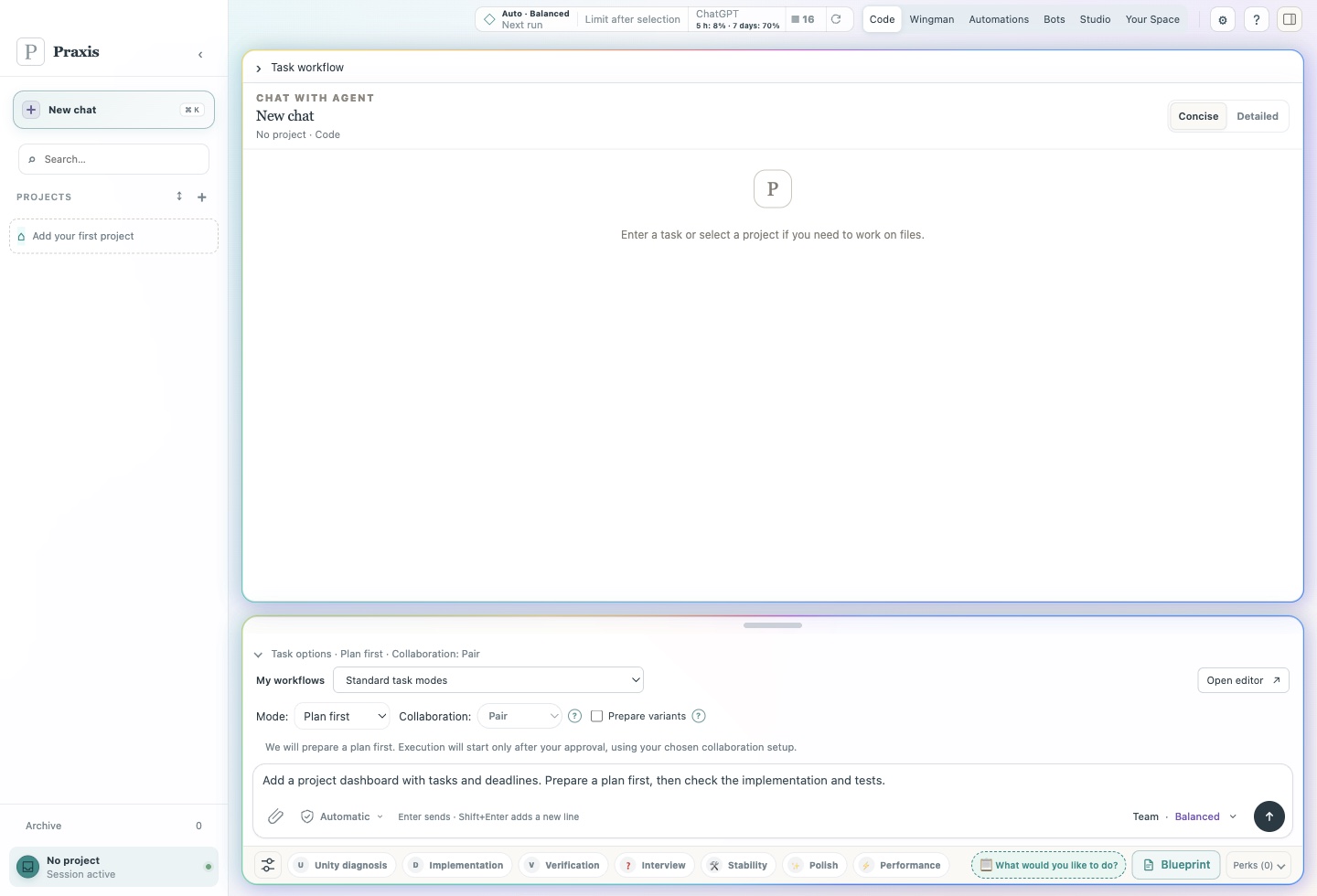
Set the goal, choose how to plan and decide how agents collaborate. Shown here: a draft task, ready to refine.
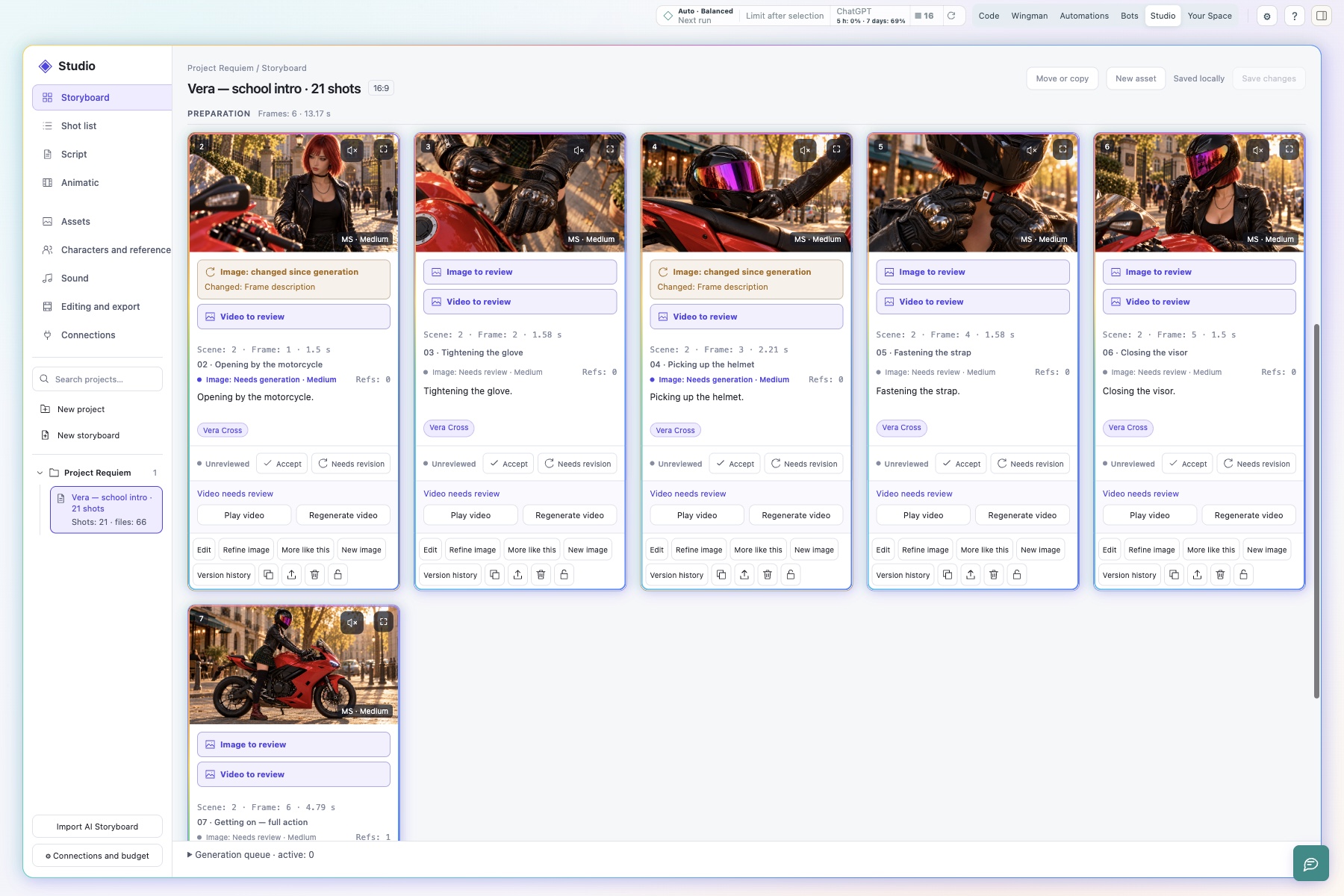
Vera is a real project by the creator: a 21-shot storyboard. The visible scene has six frames, with materials awaiting review.
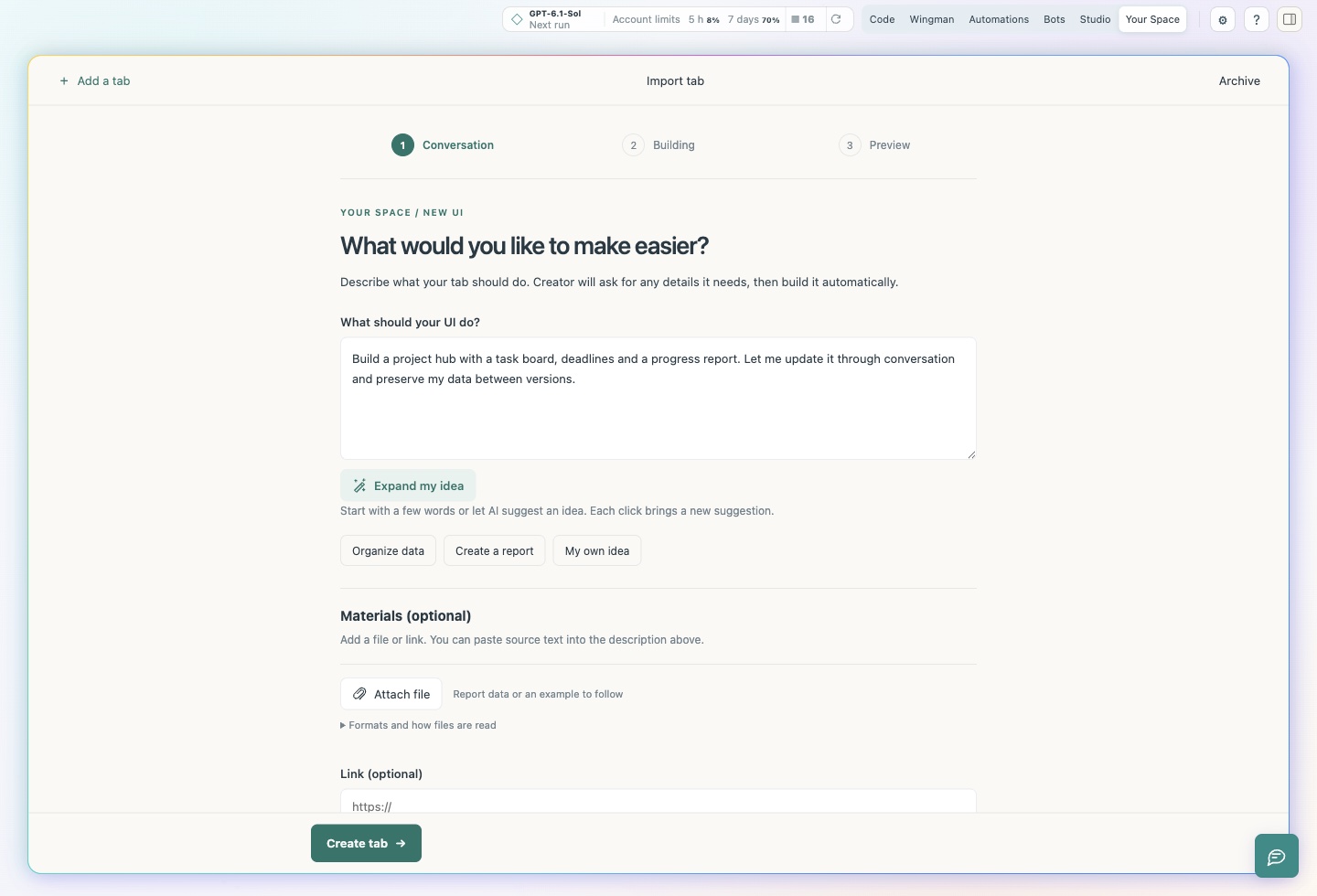
Describe what you want to improve. Creator gathers the goal and context for a custom mini-app. Shown here: a sample instruction before submission.
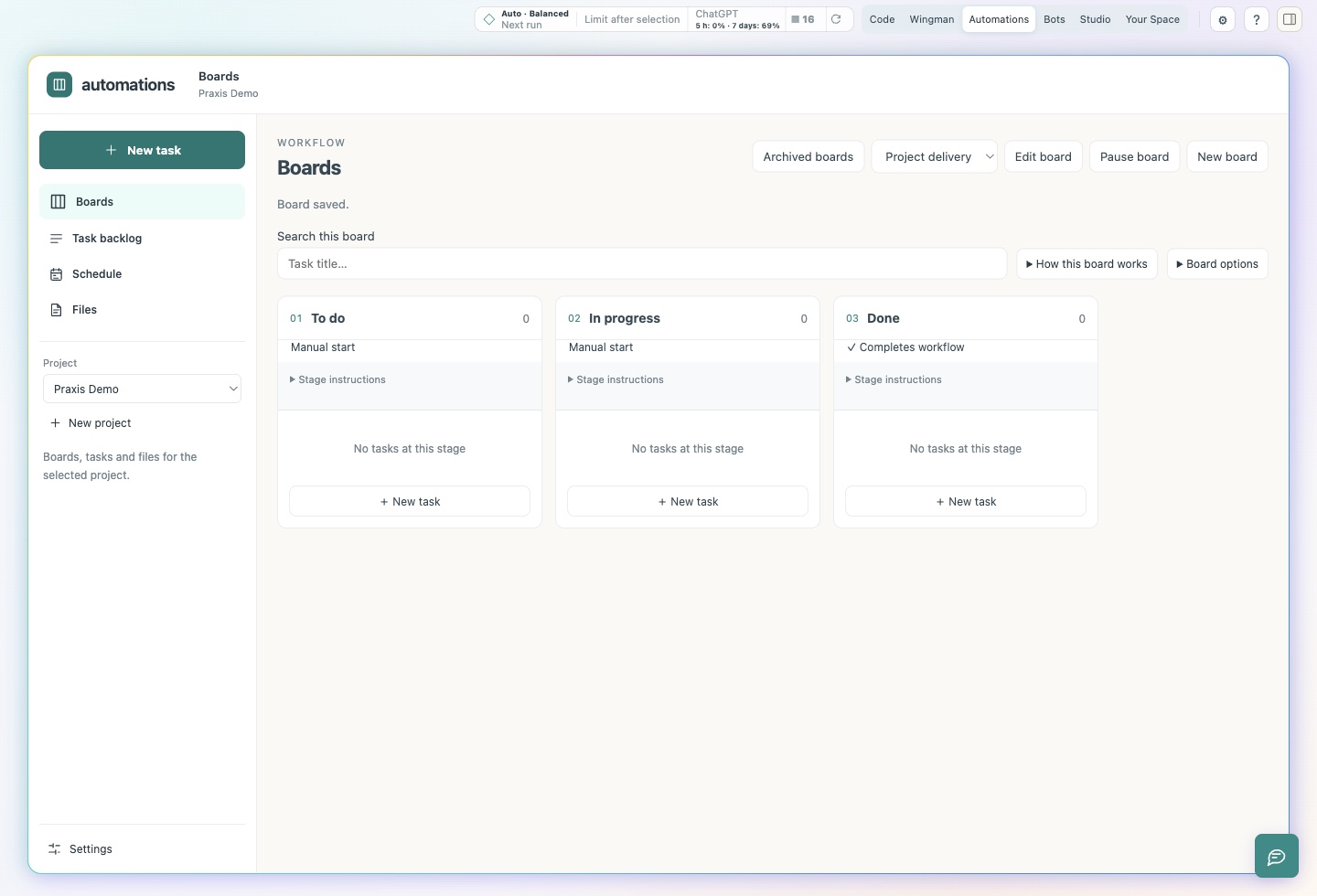
Organise work into stages on a board. This example shows the manual setup before cards or tasks are added.
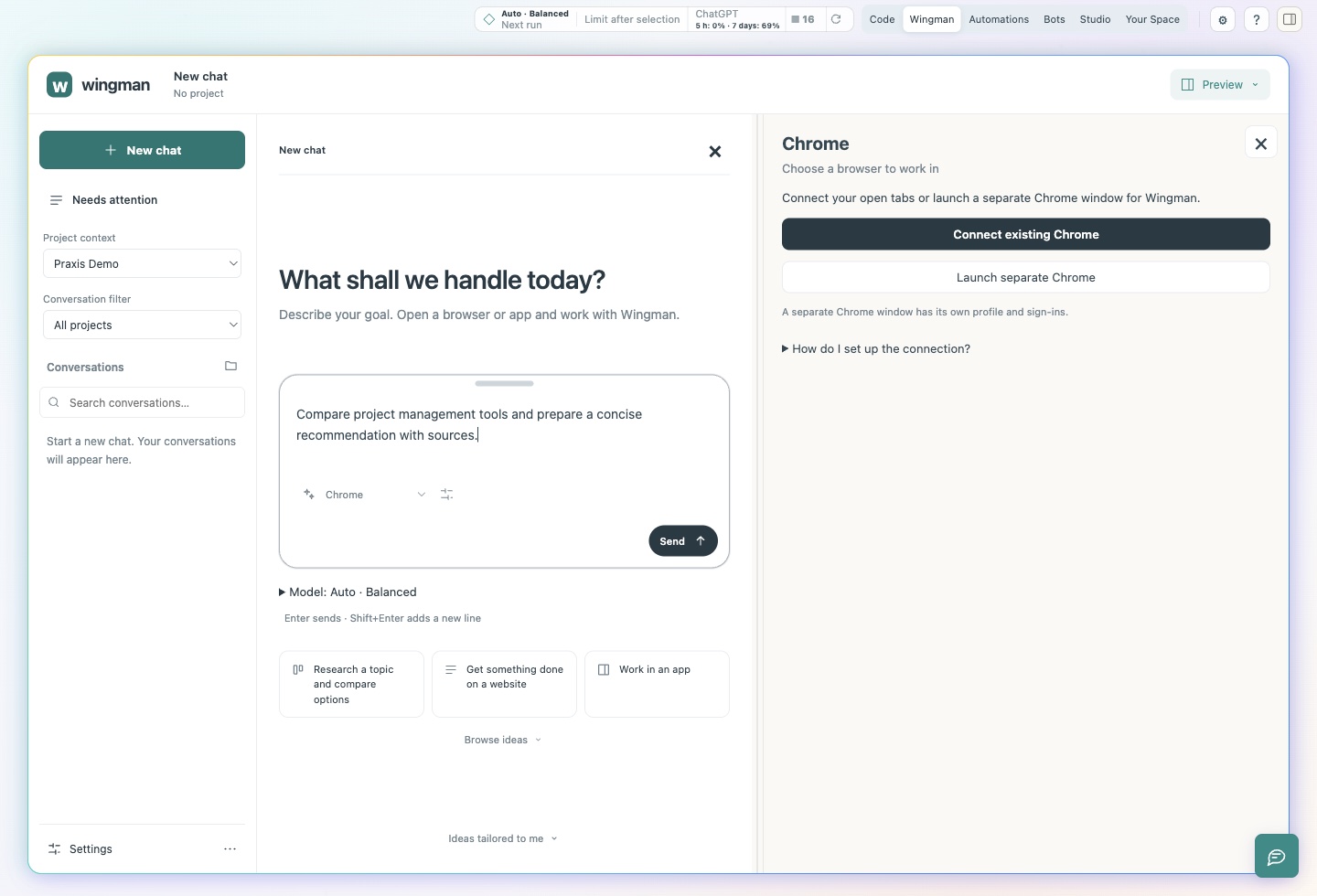
Bring in context from a selected Chrome tab and start with the task at hand. Shown here: a draft message before a session starts.
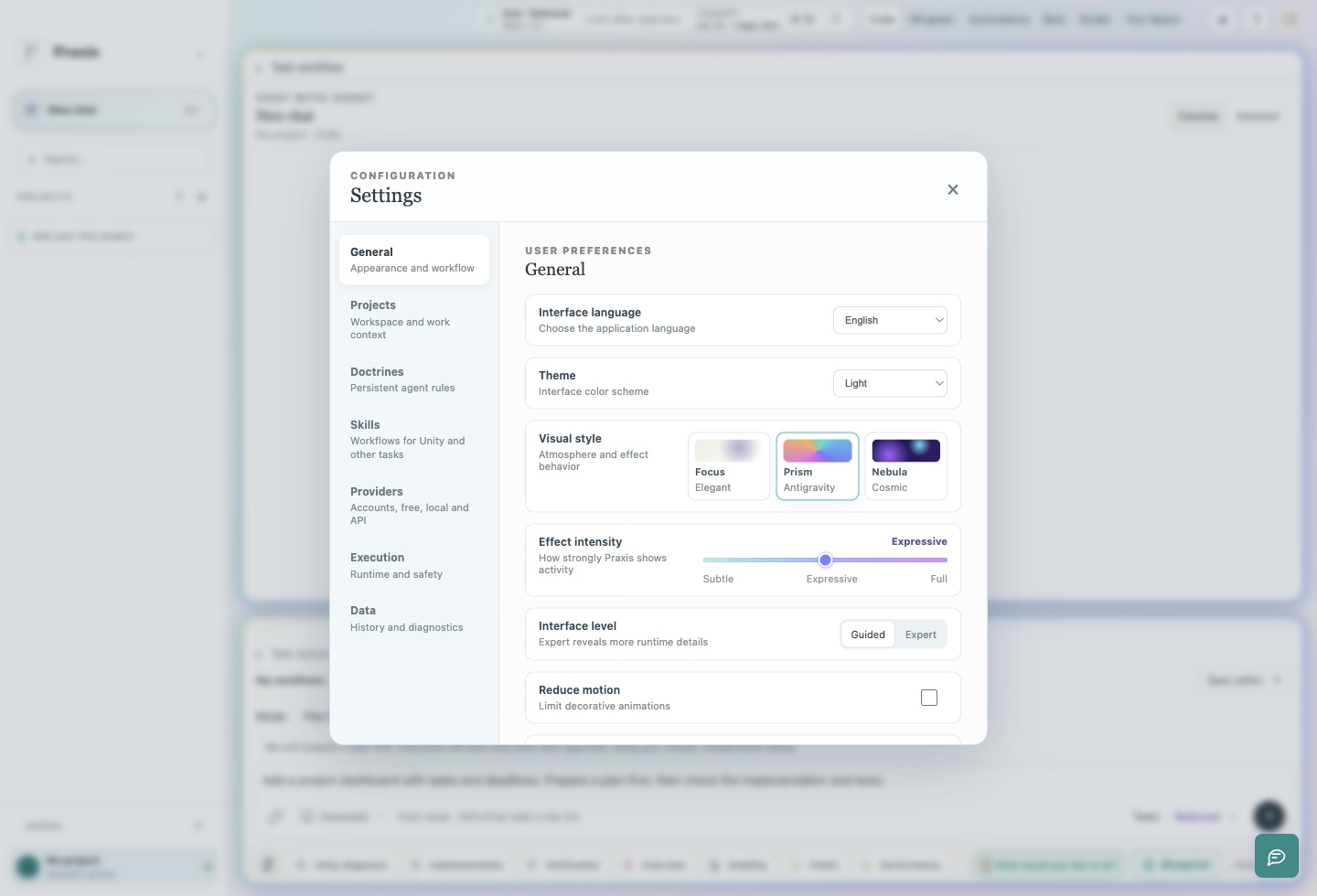
Choose the language, theme and visual style. Shared settings keep the application consistent.
From script and storyboard to images, clips and sound. Develop each shot and keep a history of your creative decisions.
Code, everyday tasks, processes and creative projects. Six modules, shared context and the freedom to choose your tools.
Plan changes, work on code and review the result. Choose one agent, a pair with a reviewer, or a team.
02Handle tasks beside a website or application window. Work with documents, files and project context.
03Define stages, conditions and schedules. Follow execution and return to the history of your work.
04Set a goal and choose a bot’s tools. Keep accounts separate, follow actions and control approvals.
05Create storyboards, images, clips and sound. Compare versions, select your material and export a film.
06Describe what you need. Creator builds a mini-app you can develop while preserving its data and versions.
Move from a broad idea to a specific capability. Open the catalogue, search for a topic and see how Praxis fits your way of working.
Streaming responses, task cancellation and additional instructions during execution. Other chats can work in the background; notifications report a finished result or a decision that needs your attention.
Technologies, manifests, scripts, Git and facts with sources. For Unity, this also includes the editor version, packages and build scenes.
Standard, Direct, Analysis, Expert Panel, Autopilot and Syzyf. You can require plan approval before execution.
Pair adds an independent reviewer and revision rounds. Team divides the work and integrates the results.
Compare solutions prepared in isolated copies. You choose an alternative before it is applied; a supported Git project is required.
Independent specialist opinions, evaluation of arguments and a synthesis. Explore a solution or assess an idea in read-only mode.
The task list shows agents, statuses, dependencies and reasons for blockers. It reports progress; it is not proof that the result is ready.
Compare changes from the last prompt or across the project. Checkpoints, restoration and protection for later edits without resetting Git history; also available outside a repository.
The goal, criteria, verification commands, evidence from the current task and limitations. Later changes invalidate earlier verification results.
Point out an issue on a page and compare views side by side or with a slider.
Context usage, bookmarked responses and continuation in a new chat with transferred context and a transcript.
The Deep Agents coordinator assesses the task, selects models and assigns work, builds a plan with criteria and dependencies, and submits it for independent review.
Agents can use different connections. Stage checks and final acceptance address the original goal. Stages in the isolated copy run sequentially.
Simple version control operations can be delegated to one agent in the current project, with independent verification. Publishing changes requires an appropriate instruction.
Project mapping, a queue of small tasks, dependencies, separate implementation and testing agents, revisions and a final assessment of the whole result.
Limits on time, tasks and rounds. Perks set the direction: stability, appearance, performance or new mechanics. Syzyf saves the queue and supports explicit resumption.
History, search and saved drafts. Start with one task or add context from a larger project.
Files, facts, saved knowledge and conversation history from the relevant Code project. The history tool retrieves earlier decisions.
Use the built-in browser, a selected Chrome tab or a shared app window. Switching the preview preserves the task description.
Create and edit text and Markdown documents, save with version checks and export to PDF.
Read preferences, propose saving them or forget them. You approve changes, and the local memory store is encrypted.
A floating conversation controls available app operations: settings, projects, queues, boards, perks, Studio and Creator.
A separate workspace for recurring work. Each card holds a goal and context; its column defines the instructions for the current stage.
Editable columns, drag-and-drop cards, conditions and templates. A stage can run a prompt, wait for manual execution or complete the process.
Times, days, intervals and time zones. Delays do not trigger a burst of missed runs.
Pause a card, a board or future starts. History preserves instructions, results and statuses; a resumed stage starts again with its history.
A shared queue handles tasks from different projects regardless of the view you are using. Praxis must be running and the required tools must be available.
Manage processes through the assistant, CLI and MCP. Deduplication and a separate review session help build workflows such as reproduce → fix → validate.
Custom instructions, materials, a start URL and an account label for each bot.
Browser sessions and cookies are separate for each bot. You handle sign-in and passwords.
Clicks, typing and image uploads require approval by default. Optional automatic execution stays within the saved goal.
Arguments, results and execution statuses. An uncertain outcome requires checking rather than blindly repeating the action.
Tasks for the same account run sequentially; different accounts can work in parallel. Subsequent runs require the app to remain open.
You select the images, and upload checks the file. An HTTP, HTTPS or SOCKS5 proxy configures browser traffic for the selected bot.
A brief, style, scenes and shots. Views for the storyboard, shot list, script, animatic, materials, characters and editing.
Appearance, personality, speaking style, reference materials and voice. Characters can be copied between projects.
Action, camera, movement, cast, location, prompt, dialogue and duration. Locks, ratings, filters and statuses for materials that need review.
New images, edits to a specific image, more similar images and multiple variations. Use references and a base image.
Saved prompts, the source image for an edit and before/after comparison. Explicitly assigning a result to a shot protects approved materials from replacement.
“Animate shot” creates video from an image. The clip and source image remain separate assets; the animatic combines clips with still frames.
Feedback on prompts, prompt refinement, project editing and generation requests through controlled operations.
Images, video, audio, storyboards and references. Copy or move storyboards between projects.
Generate character lines, sound effects and instrumental music.
Separate narration tracks. Export can combine clip audio, dialogue, narration, music and effects.
Local rendering with FFmpeg/FFprobe, an SRT file, a manifest and a media package. Handoff to Code prepares instructions with the local export path.
Generate and edit images using text and references. ChatGPT uses Codex sign-in and the account quota; Gemini requires an API key.
Separate image and video workflows, base images, references and saved remote task IDs.
An image-to-video adapter plus voice, sound effect and instrumental music generation.
Profiles for images, video and speech: authentication, status polling and result mapping. Templates include Seedance/BytePlus and MiniMax.
Providers require your own account or configuration. Paid adapters depend on service permissions; FFmpeg/FFprobe must be available locally.
An interview, attachments, context and idea refinement. Mini-app building, a real preview and explicit activation of a saved version.
Navigation, forms, local collections and files. Declared AI actions show progress and support cancellation.
Add instructions during generation, get suggestions for further development and undo suggestions.
Interface history, compatible rollback, separate test and active data, archiving, restoration and full-screen mode.
Schema and JavaScript checks plus a hidden test that clicks, types and creates a record. Detected errors are passed to the next revision attempt.
A separate WebContentsView and session with limited data and AI access. A completed local view works without a model running continuously.
Supported ChatGPT/Codex, Google and Claude Code accounts, or local models. Available actions and tools depend on the selected engine.
Codex/ChatGPT, Claude Code, Google, OpenCode, compatible API gateways and local servers. You choose the providers.
Includes Ollama, LM Studio, LocalAI, vLLM, LiteLLM, OpenRouter, Groq, Gemini API, OpenAI API, DeepSeek, xAI, Vercel AI Gateway, Azure and a custom Responses endpoint.
Model-dependent reasoning settings and profiles for quality, savings and oversight. Separate models for analysis/planning, execution and verification.
Selection considers the current catalog, availability, account quotas, benchmarks, short tests and the needs of the task.
“Free only” or “Within my accounts.” If no permitted model is available, the payment scope is not expanded automatically. “Use available limits” favors permitted models with quotas approaching renewal.
Switch an unavailable model before substantive work begins, preserving permissions and budget. A tool action with an uncertain outcome is not automatically repeated.
A local model loop, files, a macOS terminal, background processes, helpers, skills, long-context handling and sessions on disk. Requires a compatible local model.
Connect Start, Model, Your decision, Condition and End blocks. Set roles, instructions, models and project access; add branches and bounded revision loops. Save templates and reuse them for later tasks. Custom graphs run on LangGraph, with SQLite checkpoints and controlled resumption.
Tokens, costs and explicitly labeled estimates or unavailable data. Optional Langfuse; including prompt content requires a separate setting.
Navigation, page inspection, clicks, typing, keys and screenshots. Separate or shared profile groups and data clearing.
Explicit MCP connection and tab selection. Closing that tab does not automatically move the agent to another page.
App Share on macOS and Windows: you choose one window; the agent reads controls and screenshots and uses controlled actions. System permissions are required.
Approval policies, password/PIN protection and explicit decisions for sensitive effects. Stop execution and review uncertain outcomes.
stdio and Streamable HTTP transports, resources and prompts. Native supports OAuth for compatible connections.
The local control API provides access to projects, chats, queues, perks, boards, Studio and Creator. The in-app assistant uses it too.
Technology detection and recommendations for bundled skills. You choose what to install, and existing skills are preserved.
Project and history analysis suggests skills, perks and reusable actions, with reasons and sources. You can accept or reject each suggestion.
Perks, skills and an overarching doctrine. Settings and instructions can apply to one project or the whole app.
An optional LanceDB index and embeddings from a local server. References to sources and lines, with ignored files respected.
Start now, after the current task, after the project queue or at a set time. Prompts retain attachments and settings; project tasks can run sequentially or in parallel.
Selected Claude Code and Codex conversations, or a ChatGPT export, copied as text to local history. Import does not resume the original tool session.
Export and import selected history, settings, Wingman and Your Space data. The package excludes accounts, keys, external repositories, Studio and bots.
History and projects are stored locally, and keys are handled by an encrypted store. Cloud models receive the context needed for the task.
Light, dark or system theme, visual styles, reduced motion and a completion sound. The interface is available in Polish, English and German.
Settings for execution limits, archiving and app behavior. You remain in control through the app settings.
No matching features. Change your search or choose “All.”
Generation and model availability depend on configured providers, accounts and local tools. Automations run locally while Praxis is open. Project data is stored locally; using an external model may require sending it the task context.
Local storage, lasting history and visible stages of work. Under the interface: an architecture that connects models, tools and control over the result.
A React interface in Electron. Projects, conversations and settings stored locally.
Agent roles, provider connections and a custom execution environment for local models.
Saved stages, task history and resumption. Separate queues for scheduled work and work in progress.
Mini-apps in separate views. Controlled data access, operation checks and action approvals.
Unit tests, integration tests and scenarios in the real Electron app. Check results tied to the task.
From a goal to a checked result
The goal, project context and completion criteria.
The right model, tools and agent roles.
Review the result, run tests and iterate on fixes.
Changes, artifacts and evidence against the criteria.
Execution depends on the selected mode. You retain access to the plan, history and control over the work.
Leave your email. I’ll let you know when the beta is available. No newsletter, just the beta notification.
I’m Filip Rudziński. I’m building Praxis. I design and develop tools that bring AI agents, automation and desktop applications together.
I’m open to project collaborations and employment opportunities building AI products. I’d be happy to talk about the problem you want to solve.
Developing a product, growing a team or interested in collaborating on Praxis? Send a few words about what you’re working on.
kontakt@praxisagent.appUpdated: 27 October 2026. The data controller for this Praxis website is Filip Rudziński. Contact: kontakt@praxisagent.app.
The site is hosted through Sites (OpenAI) and Cloudflare. Infrastructure providers process technical connection data, including IP addresses, to deliver the site and prevent abuse. The basis for processing necessary security data is the controller’s legitimate interest (GDPR Article 6(1)(f)). We do not store IP addresses in the analytics database.
__cf_bm for bot protection; it expires after 30 minutes of inactivity. We store your privacy choice in localStorage under praxis:privacy:v1 for 180 days. These technologies are not used for advertising.sessionStorage keys praxis:metric:* to avoid counting an event repeatedly and retain its traffic source category within the same language and tab. These markers expire with the tab’s session. Rejecting or withdrawing consent removes our analytics markers.With consent, we count the UTC day, language, approximate country supplied by the host when available, traffic source category, device type and a category for the recognised client. Events are pageviews, engagement after at least 20 seconds of visible time and interaction, and clicks leading to the waitlist. These are aggregate counters, not a person’s history. Bot detection is approximate; a regular browser does not prove that a visitor is human.
We do not store full page or referrer URLs, raw user-agent strings, user identifiers, form contents in analytics, session recordings or device fingerprints. We do not link analytics to waitlist email addresses. Optional analytics relies on consent (GDPR Article 6(1)(a)). Detailed aggregates are removed after 365 days on the next write; historical daily totals without these categories may remain. DNT/GPC signals are respected.
With separate consent, we store your email address, language, signup date and consent version to notify you when the beta is available. Your address is kept until that notification is sent or you withdraw consent. Signing up is voluntary and does not require analytics consent. There is no newsletter. Contact the controller to withdraw consent and delete your address. Correspondence is handled to answer your enquiry and carry out any agreed collaboration.
OpenAI/Sites and Cloudflare provide the infrastructure; contact email is handled through OVH and Gmail/Google. Providers may process data in different countries, including outside the EEA. Their policies describe processing and safeguards: OpenAI, Cloudflare, OVHcloud, Google.
You can change your choice at any time using “Cookie settings” in the footer. Withdrawal stops future analytics without affecting the lawfulness of earlier processing. Aggregate counters cannot be attributed back to a person. Where applicable, you have rights of access, rectification, erasure, restriction, portability and objection, and may complain to the Polish data protection authority (UODO). Send requests to the controller’s contact address.